Web 用戶端 (瀏覽器) 可以透過 HTTP Get 或 Post 的方式將資料傳送給 Server 的 CGI 處理。
但我們也可以透過仿造 URL 或擷取封包修改內容的方式,將修改過後的內容傳送給 Server,不經由原本用戶端的 Form 或 JavaScript。因此除了在用戶端驗證資料的正確性與合法性,也必須在 Server 端作相同的驗證。
以下舉出幾種必須驗證的 Case:
1. 資料長度太長。
2. CGI 要接收數字但傳送過來的資料包含數字與其他字符。
3. 資料沒有落在定義的範圍中。
4. 沒有限制接收檔案的大小。
如果涉及敏感的資料如帳號密碼,必須要先加密後再傳輸。
2013年8月13日 星期二

2013年6月19日 星期三
2013年5月9日 星期四
Web 控制 Browser Cache 的方式
 http-equiv="Cache-Control" content="no-cache, no-store, must-revalidate" />
 http-equiv="Pragma" content="no-cache" />
http-equiv="Expires" content="0" /> Reference:https://developer.mozilla.org/en-US/docs/HTTP_Caching_FAQhttp://hungred.com/how-to/tutorial-stop-caching-jquery-javascript/http://stackoverflow.com/questions/49547/making-sure-a-web-page-is-not-cached-across-all-browsers 2013年2月18日 星期一
2013年1月27日 星期日
Browser Cache
public— marks authenticated responses as cacheable; normally, if HTTP authentication is required, responses are automatically private.private— allows caches that are specific to one user (e.g., in a browser) to store the response; shared caches (e.g., in a proxy) may not.no-cache— forces caches to submit the request to the origin server for validation before releasing a cached copy, every time. This is useful to assure that authentication is respected (in combination with public), or to maintain rigid freshness, without sacrificing all of the benefits of caching.no-store— instructs caches not to keep a copy of the representation under any conditions.
Reference:
http://www.mnot.net/cache_docs/#CACHE-CONTROL
2012年11月9日 星期五
CSS:opacity 的相容性
以這段程式碼為例:
function gradient(id, level)
{
var box = document.getElementById(id);
box.style.opacity = level;
box.style.MozOpacity = level;
box.style.KhtmlOpacity = level;
box.style.filter = "alpha(opacity=" + level * 100 + ")";
box.style.display="block";
return;
}
box.style.opacity = level; //相容於 Firefox、Safari、Opera、IE8 and previous
box.style.MozOpacity = level; //Firefox 0.9
box.style.KhtmlOpacity = level; //Safari 1.2
box.style.filter = "alpha(opacity=" + level * 100 + ")"; //IE9.0 and above
Reference:
https://developer.mozilla.org/en-US/docs/CSS/opacity
HTML: div 和 span 的差異
div 和 span 都可以利用 id 或 class 的宣告經由 CSS 來定義 style。
兩這間的差異主要在於,
div 是一次定義一整個區塊,
而 span 則是定義區塊內部的其中一部分,
所以div 當中可以夾帶一個以上的 span ,
span 中定義的內容不會受到外部 div 的定義影響,
讓區塊中的 style 變化更加豐富。
Reference:
The SPAN and DIV HTML Elements
2012年9月1日 星期六

2012年7月26日 星期四
Basic CSS Concept
Three ways to insert CSS:
1. External style sheet
2. Internal style sheet
3. Inline style
Multiple style sheets:
If some properties have been set for the same selector in different style sheets,
the values will be inherited from the more specific style sheet.
Cascading order:
1. Browser default
2. External style sheet
3. Internal style sheet (in the head section)
4. Inline style (inside an HTML element)
Reference: http://www.w3schools.com/css/css_howto.asp
1. External style sheet
2. Internal style sheet
3. Inline style
Multiple style sheets:
If some properties have been set for the same selector in different style sheets,
the values will be inherited from the more specific style sheet.
Cascading order:
1. Browser default
2. External style sheet
3. Internal style sheet (in the head section)
4. Inline style (inside an HTML element)
Reference: http://www.w3schools.com/css/css_howto.asp
2012年7月19日 星期四
URI / URN / URL
http://en.wikipedia.org/wiki/Uniform_resource_identifier
URI (Uniform Resource Identifier):
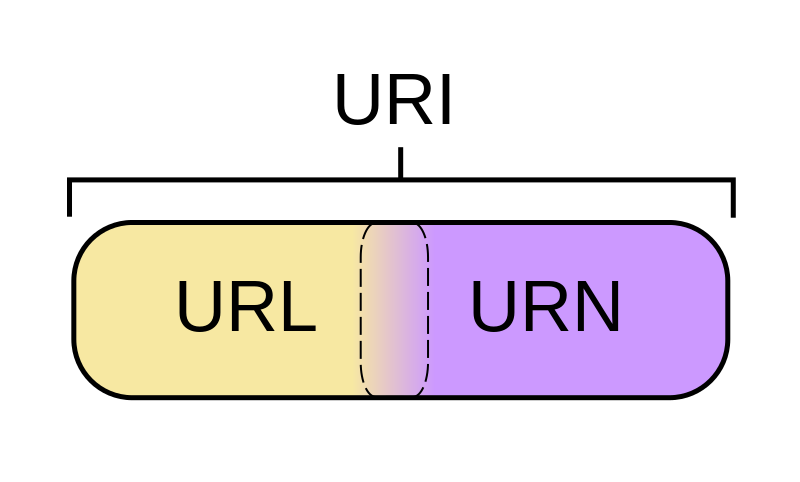
如圖所示 URI 包含了 URN (Uniform Resource Name) 和 URL (Uniform Resource Locator)

URI (Uniform Resource Identifier):
如圖所示 URI 包含了 URN (Uniform Resource Name) 和 URL (Uniform Resource Locator)
訂閱:
文章 (Atom)